Your child spent Year 7 dragging blocks around a screen, and now Year 8 wants them typing Python with nothing to snap into place. One missing bracket stops the program and confidence drops fast. A KS3 Computer Science tutor from RS Remote Tutoring rebuilds that step slowly, with your child at the keyboard.
Your child and one tutor meet live on Zoom, and the shared screen shows every keystroke, so a missing colon is caught in seconds. We keep pace with whichever computing unit the school has reached. Seven of our tutors teach KS3 Computing, including a software engineer, a web developer and a computer science graduate.
No card details for the trial. No obligation to continue.
Live one-to-one lessonsPersonal tutor matchingFree 30-minute trialEnhanced DBS checked tutorsTeaching since 2020
What lessons cover
What does KS3 Computer Science tutoring cover?
Our KS3 Computer Science tutoring covers what schools teach in computing from Year 7 to Year 9: programming, algorithms such as searching and sorting, binary and data representation, hardware and software, networks and safe use of technology. Lessons follow your child’s school topics.
Programming, from blocks to Python
The national curriculum expects students to use at least two programming languages during KS3, and at least one must be typed rather than built from blocks. Many schools start with a block-based tool, then move to Python.
We work on the ideas underneath: sequence, selection, loops, variables, lists and functions. Once your child understands what a loop actually does, the switch to typed code feels far less daunting.
Algorithms and computational thinking
Students learn to break a problem into steps, write those steps as a flowchart or pseudocode, and follow well-known algorithms such as linear search, binary search and bubble sort.
Tracing by hand is a skill of its own. Your child learns to step through an algorithm one line at a time and explain why one method is quicker than another for the same job.
Binary and data representation
Computers store everything as binary digits, and KS3 students learn how: converting between binary and denary, adding binary numbers, and how text, pictures and sound become data.
This topic leans on number skills. If place value or powers of two are shaky, the tutor fixes that first so the binary work has something solid to sit on.
Digital systems, networks and safety
Lessons cover the hardware and software inside a computer, how instructions are stored and carried out, simple Boolean logic with AND, OR and NOT, and how computers communicate across a network.
Using technology safely is part of the course too: protecting privacy and identity online, recognising inappropriate content or contact, and knowing how to report a concern.
Programming, algorithms and data representation for Years 7, 8 and 9, taught one-to-one online.
Years 7, 8 and 9
What changes across Years 7, 8 and 9?
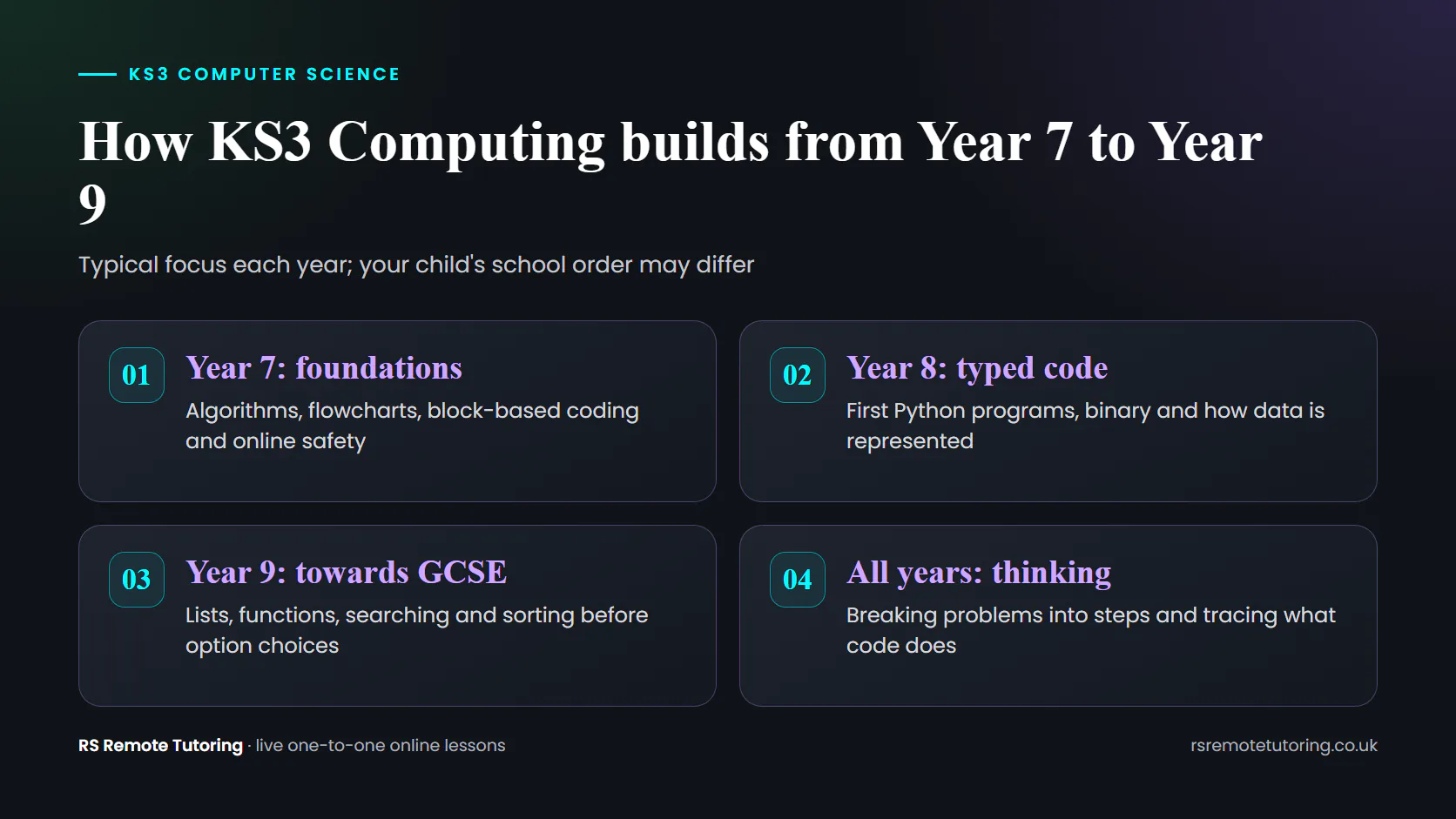
Each KS3 year builds on the last. Year 7 usually sets up computational thinking and early coding, Year 8 often brings typed code and binary, and Year 9 moves towards GCSE-style programming. Tutoring picks up from wherever the class has reached this term.
Year 7: thinking like a programmer
Year 7 is often the first proper computing course. Students meet algorithms, flowcharts and block-based programming, alongside online safety and what is inside a computer.
Lessons focus on clear, step-by-step thinking. A Year 7 might build a simple quiz with blocks, then explain each decision in plain English before testing it.
Year 8: typing real code
Year 8 is when many schools move to Python, and when students who coped well with blocks suddenly feel lost. Binary, data representation and simple networks often arrive this year too.
A typical Year 8 lesson might rewrite a block-based loop in Python, then fix the indentation and spelling errors that stop it running.
Year 9: ready for GCSE choices
Year 9 brings longer programs, lists, functions and searching or sorting algorithms, and GCSE option choices happen during it. Students who decide in Year 8 that coding is not for them rarely choose it a year later.
Lessons build the programming and problem solving GCSE assumes, so the choice rests on real ability rather than one bad term.
Lessons pick up wherever your child is in this sequence, following the school’s own order.
Is it right for your child
Who is KS3 Computer Science tuition for?
KS3 Computer Science tuition suits students who enjoyed block coding but stall on Python, find binary confusing, avoid computing homework, or are weighing up GCSE Computer Science and want a firm base. It also stretches confident coders who need harder problems.
A KS3 computing tutor tends to make the biggest difference for students who:
copy code from the board but cannot write a program on their own;
see an error message and give up rather than reading it;
mix up binary and denary or lose track of place value;
leave computing homework until last because it feels impossible;
are considering GCSE Computer Science in Year 9 and want to be sure;
already code at home and want proper problems to stretch them.
Some students simply need a patient adult who lets them make mistakes without fuss. Others need a challenge their class cannot give them. The trial shows which, and lessons are planned from there.
Inside a lesson
What does a typical KS3 Computer Science lesson look like?
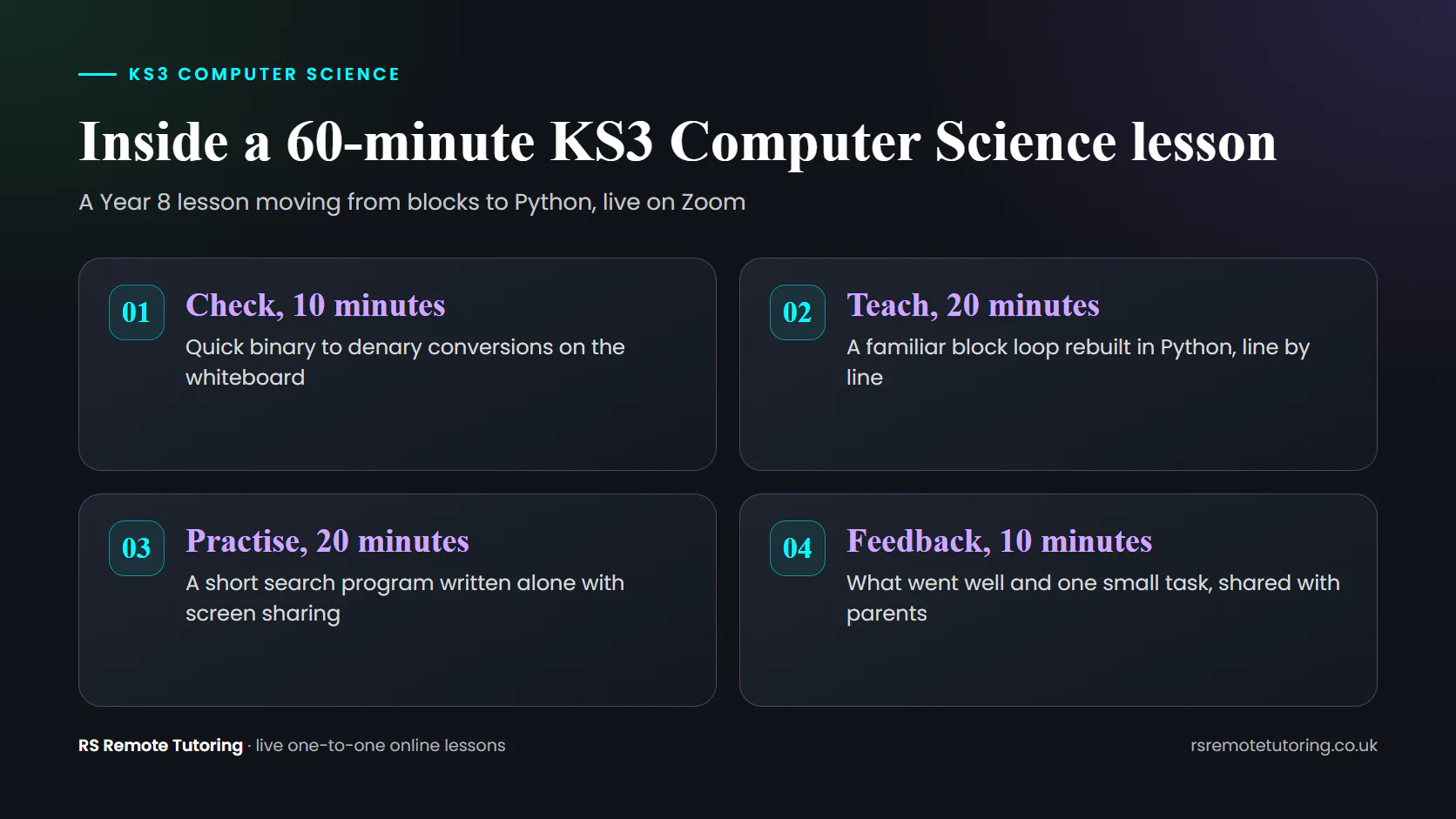
Each KS3 lesson is 60 minutes long, on Zoom, with your child sharing their screen. This Year 8 example moves a student from block-based code to Python: a short binary warm-up, a familiar loop rebuilt in typed code, a search program written alone, then feedback.
CheckAbout 10 minutesThree quick binary to denary conversions on the whiteboard. If place value is the real problem, the tutor spends a few minutes on it before moving on.
TeachAbout 20 minutesThe tutor shows a block-based loop your child already knows. Your child then types the Python version line by line, saying what each line does as they go.
PractiseAbout 20 minutesYour child writes a short program that checks whether a name is in a list, a simple linear search, while sharing the screen. When an error appears, the tutor asks them to read it aloud and find the line.
FeedbackAbout 10 minutesA recap of what went well, what still needs practice and one small task before next week. Parents get the same summary in plain English.
The first lessons also show where the real gap sits. It might be typing accuracy, the logic of a loop, number skills or simply nerves, and each one needs a different plan.
The same rhythm every week makes progress easy to spot, even without an exam grade.
Who teaches KS3 Computing
Who will teach my child KS3 Computer Science?
Your child is taught by one of seven tutors who cover KS3 Computing, matched on year group, confidence and what is going wrong. They include a software engineer, a web developer and a computer science graduate. A free trial comes before any booking.
Rachel Thompson
Coding and problem solving
Computer Science specialist
Digital skills
Rachel teaches coding as a way of solving problems rather than a list of commands to memorise. That suits KS3 students who find computing dry, or who decided after one hard lesson that they are not a coding person.
Bilal Qureshi
Computer Science, Maths and Science
BSc Computer Science
A computer science graduate who also teaches KS3 Maths and Science. Helpful when binary or algorithms are being held back by number skills, because the same tutor can see both sides of the problem.
Hamza Latif
Computer Science and web technologies
BSCS
Web developer
Hamza studies computer science and builds websites for work, so code feels practical in his lessons. Students see a program run and change in front of them, which helps when the ideas feel abstract.
Daniel Evans
Programming and algorithms
UK based
Exam focused
Daniel teaches algorithms and computational thinking slowly and in order. At KS3 that means tracing searches and sorts step by step until your child can explain them, not just recognise them.
Sidra Paracha, Marko Jensen and Raja also teach KS3 Computing. All seven teach GCSE Computer Science as well, so your child can keep the same tutor into Year 10.
All seven hold a current enhanced DBS check for their work with under-18s, and we confirmed each one’s identity, certificates and references before their first computing lesson.
Four steps to start
How does my child begin KS3 Computer Science lessons?
Tell us the year group, the coding tool school uses and where your child gets stuck, whether that is blocks, Python or binary. Our coordinator chooses a single tutor, giving the reason, and after a free 30-minute coding trial the decision is yours.
Tell us where the code breaksShare the year group, the computing unit the class is on, the tool or language the school uses and the days that suit.
Get one named tutorOur coordinator reads it and suggests a single KS3 Computing tutor, explaining why that person fits your child, instead of sending a list.
Write code in a free trialOn Zoom, your child builds a few lines of Python or a block program while the tutor watches the shared screen. We take no card details, so there is nothing to cancel later.
Fix a weekly coding hourIf the trial goes well, the same tutor teaches at the same time every week. If the pairing feels wrong, we find another tutor free of charge.
A recent piece of computing homework, a report comment or a screenshot of the coding tool the class uses gives the tutor a useful starting point.
An hour of one-to-one KS3 Computer Science costs £30, as at GCSE and A-Level. Families booking three or more hours weekly pay £27.50 each. On the annual plan, paid in advance, each lesson is £25, and the first half hour is free.
Meet your tutor first
Free
30-minute one-to-one trial on Zoom
No card details. No obligation to continue.
Standard lesson
£30
60-minute one-to-one online lesson
The same rate for every tutor and every level.
Three or more a week
£27.50
Per 60-minute lesson
For families booking three or more lessons each week.
Annual plan
£25
Per 60-minute lesson, paid upfront
48 weekly lessons for £1,200.
One lesson a week is enough for most KS3 students, which comes to £120 a month at the standard rate. Some families book just a handful of sessions to get past one stubborn topic, such as binary, and there is no sign-up or matching fee either way.
Why choose RS Remote Tutoring for KS3 Computer Science?
Families choose us for tutors who write real code, lessons where your child does the typing, and updates after every session that say what changed. Since 2020 we have taught UK students, and KS3 lessons track the school’s computing units instead of a separate syllabus.
Tutors who build software
Two of our KS3 Computing tutors write code professionally, one as a software engineer and one as a web developer. Your child learns from people who fix real programs every week.
Updates in plain English
Every session ends with a short note for you: the topic, the progress, the sticking point and the next small task. That matters at KS3, where there is no exam grade to show whether tutoring is working.
Checked tutors and a free rematch
Before teaching, every computing tutor clears identity, certificate and reference checks, and those with under-18s hold an enhanced DBS. Should your child and tutor not click, we swap tutors free of charge at any point, without losing a lesson.
Many Year 7 to 9 coders find binary easier once their number work is secure. Our KS3 tutoring can add KS3 Maths tuition next to computing, arranged by the same coordinator.
London and UK families
Can my child join KS3 Computing lessons from outside London?
Yes. KS3 Computing lessons happen on Zoom, so a Year 8 in Bristol or Norwich codes from home just as a London student would. We are a Feltham, Greater London business, and times fit around school, clubs and tutor diaries.
A laptop or desktop with a webcam suits coding best, along with everyday home broadband and the free Zoom app. Python and most school coding tools are free as well, and the tutor can help set them up during the trial.
Some Year 7s like a parent nearby for the first session or two. After that, most prefer to code with the tutor on their own, and you never need to sit in.
When Year 9 option choices come round, our GCSE Computer Science tutoring carries on with the same tutors, so moving into Year 10 does not mean starting again with someone new.
Common questions
Frequently Asked Questions
Quick answers for KS3 parents on Computing fees, block coding and Python, choosing a tutor, homework help and the free trial.
What does KS3 Computing tutoring cost per lesson?
Each hour is £30. At three or more lessons a week the price is £27.50, and the upfront annual plan makes it £25. Your child’s 30-minute trial costs nothing, and we take no card details.
Is KS3 Computer Science the same as KS3 Computing?
Yes. Most schools call the subject Computing at KS3 and Computer Science at GCSE. Either way, the content is the national curriculum computing programme, taught in the sequence your child’s school uses.
Which coding languages do you teach at KS3?
We follow the school, which often means a block-based tool first and Python later in KS3. Name the tool or language on the enquiry form and the coordinator will pick a tutor comfortable in it.
Do we need a copy of the school’s scheme of work?
No. The year group and a recent piece of homework are enough to start. The tutor checks what the class is covering and fits lessons around it.
Will the tutor just do my child’s computing homework?
No. The tutor helps with homework, but your child does the typing and the thinking. The aim is that they can write the next program without help.
Should my child have tutoring before choosing GCSE Computer Science?
It can help. A term of lessons in Year 9 shows whether your child enjoys programming and can manage it, so the option choice rests on real evidence rather than one hard topic.
Does my child keep one Computing tutor from week to week?
Yes. The same tutor teaches at a fixed weekly time and can carry on into GCSE Computer Science. If the pairing is not working, we swap tutors without charge.
How do we book a KS3 Computer Science trial?
Use the trial form, choose KS3 and Computer Science, and add the year group, the main difficulty and times that suit. We reply with a named tutor and a confirmed trial slot.
Free 30-minute trial
Turn “I can’t code” into a program that runs
Start with the topic that worries your child most. In a free 30-minute session, a KS3 Computing tutor watches your child code, spots whether the trouble is logic, typing or confidence, and suggests a plan for the coming weeks.